But boy, could it multitask. Sixteen apps running simultaneously on the N900’s task management screen. And sixteen is just the most you can show without scrolling. Like a PC, there is no upper limit except available memory.
Two years ago Nokia’s future was going to be Maemo, a cutting-edge operating system based on Linux with a sleek interface to replace the veteran Symbian OS. The phone that would bring it was the N900. This had the same processor as the rival iPhone 3GS, plus a much better screen and camera, neat slide-out keyboard, a kickstand and great stereo speakers for watching video, and even features the iPhone lacks to this day like real multitasking and a memory card slot.
As Nokia had been and was still the leading maker of smartphones, you might imagine a pent-up market of loyal customers gagging for a device that would show that upstart Apple. Yet when it arrived they stayed away in droves. The N900, very arguably the most advanced and capable phone yet made, was a magnificent, absolute, utter market failure.
What the hell went wrong? More than one thing, clearly. A phone with that much going for it could surely have survived one weakness, maybe even two or three, and still gone on to be a big seller.
Four though is pushing it.
Not its best angle
The other week I showed it to an iPhone-using friend. She was interested, but asked – quite innocently – “Why is it so thick?” It’s true, it’s as thick as a brick. Downright chubby. Though its other dimensions are almost identical to the iPhone 3GS, it’s half again as deep. Is that such a bad thing? Thickness is actually a practical advantage in a phone, there’s little chance of cracking this one in your pocket. But such arguments weigh little in the scales of fashion. People have to be slim, therefore our phones have to be slim too – that seems to be about all the logic there is to it.
An even more damaging shortfall though was the strange absence of multitouch. Perhaps Nokia had too little experience with the necessary screen technology, but launching the N900 without a modern interface was like naming a ship “Abandon”. A resistive screen with a stylus for tapping little icons was an interface from obsolescent Windows Mobile and historic Palm devices. Nobody wanted one now.
Nobody, except a few freaks such as myself. Resistive is far better suited to drawing than the capacitive type of screen used for multitouch. Capacitive requires a large contact area with the surface, making precise detail impossible. Plus it lacks any dimension of pressure sensitivity, while resistive screens can be highly responsive to changes in the pen press.
Combined with pressure-aware Linux drawing applications like MyPaint, this ‘outdated’ resistive interface allowed realistic pen-like or brush-like drawing strokes. This made the N900 the best phone ever created for art,¹ a powerful but sensitive digital sketchbook you could carry in a pocket. Many of the cartoons appearing on this blog were done with it – pencilled, inked, coloured, lettered and uploaded without ever seeing paper or PC. You can even edit images with GIMP, a program with capabilities comparable to the full desktop version of Adobe Photoshop.
But the very thing that most endeared it to me was a huge turn-off to the wider public.
Looks better this way
Then there was the lack of apps. As Apple were first to realise, shopping is part of the experience now. A phone is nothing without stuff you can buy for it. There are some very good apps available for Maemo – but almost none to buy. Its Open Source Software roots meant that people were keen to contribute useful stuff. With a little tweaking it could even run apps built for desktop Linux. But that actually worked against a market for the Maemo platform. Professional app developers were discouraged by having to compete with free.
And this cultural clash, Open Source on one hand and commerce on the other, created other unforeseen problems. If you’ve got an issue with a community-developed program, to whom do you complain?
You don’t. In the cooperative world of OSS you file a bug report, documenting the issue and the circumstances that produce it. Which is lovely, but customers who’ve paid money for a fancy phone hardly expect to have to help out as well.
Terminal: Fatal
Nor do they expect tech support that tells them to open a terminal window and enter Linux commands. That isn’t actually as intimidating as it might sound, but “Buy this and soon you’ll be learning Linux” is not the sort of slogan that say Apple would use. Or indeed anyone who wanted to sell anything.
And yet… It was so damn promising. If they had moved quicker to smooth off the edges of Maemo, if something like the N9 had arrived a year earlier – while people were still actually waiting for it – it might have been a hit instead of a peculiar footnote². Instead, Nokia paid brutally for not getting their collective arse in gear.
But, it was a remarkable achievement and a fascinating experiment. Even when it’s no longer my primary phone I’ll keep the N900 around, especially for travel, as an incredibly miniaturised PC. They can be picked up new on Ebay for under $200 now, I recommend them highly.
Though Samsung were later to make the impossible dream come true by putting an actual Wacom digitizer on a phone.
A footnote to the footnote: There are rumours that Nokia have quietly continued their Linux-based development – just not for smartphones. Dubbed Meltemi, a descendent of Maemo is rumoured to be the future replacement for the S40 “dumbphone” system that has done so well for them for so long, and could be used to bring smartphone-like features to low-cost devices. That might prove competitive against the rising tide of (frequently awful) cut-price Androids. A sad end for the noble Maemo maybe, but it could save Nokia’s bacon – and of course make them less dependent on Microsoft. Who’s to say that a Linux smartphone will not rise again?
And now, a guest post. Matthew lives in the UK where they’ve had the Samsung Galaxy Note for a couple of months now, so he’s had time to discover what it’s really like to use. Bear in mind he has the international version as opposed to AT&T’s US-only one. This has a faster processor but no LTE or NFC.
Galaxy Note Guest Review By Matthew
The Note’s browser – click for actual pixels
I was looking for a device small enough to carry anywhere yet large enough to function as a tablet. My previous phone was a Dell Streak, an earlier 5″ phone/tablet hybrid. This was much-maligned – because of its size in part, though Dell did it no favours by failing to properly market it and releasing it with Android 1.6 (Donut). Once upgraded, the Streak was a capable device. The hardware was extremely solid, and the large screen very useful for web browsing and email. I hoped then that it would be a success and spark off a wave of similar-sized phones. With luck, the Galaxy Note will succeed where the Dell Streak failed.
Form Factor
The main thing giving potential buyers pause is of course the size. While the Note is undeniably large – 46.9 x 83 x 9.7 mm – it isn’t that big a step up from the many 4.3″ phones that are available, although when I compared it to a work colleague’s iPhone the difference was more apparent. A preconception reviewers seem to have is that it must be too large and heavy for making regular phone calls. While this was a possible issue with the Dell Streak, the Galaxy Note is a lot lighter and thinner – at 176 grams it’s only about 25% heavier than the iPhone. People with small hands may have more difficulty than I do, but unless (like my annoying housemate) you’re going to be making two-hour-long calls I can’t see the size being a problem for most people.
The Note comes with the same Gorilla glass as the Dell Streak – although it doesn’t feel quite as solid, possibly due to the reduced weight. Many may find it too large for everyday use, but for me it’s the ideal size – large enough for web browsing and occasional content creation, yet still small enough to be carried everywhere. One of the great things about Android is that the variety of devices out there means there is pretty much one for everyone, and many will feel the need for one this size.
For the non-phone functions it’s pretty usable in portrait mode with one hand, but in landscape using the Note is definitely a two-handed operation. The Keyboard is too large to be reaching across from one side to the other, and if you’re not careful it’s very easy to drop. You wouldn’t want to be trying to send text messages with it while walking down the street. Also, it’s very easy to pick up the device upside down without noticing, then wonder where the hardware keys have got too. (For you lefties though, it works perfectly well that way round.)
The second common objection is that users will look like wallies holding it next to their heads. I haven’t experienced that problem myself – most people at work have been impressed when they see what the Note can do. A couple have commented on the size but agree it’s worth the pay off, and those who have said the Note is too large all belong to the “All you need is something that will make calls” brigade.
As for carrying it around, it has to be said – you need big pockets. As I say, its not that big a step up from the larger Android smartphones, but it’s a lot less portable then an iPhone, let alone a regular-sized phone. If, as I would recommend, you attach one of the many hard cases available to protect the Galaxy Note, the bulk increases further. This hasn’t been an issue for me personally, I carry more stuff in my pockets than Doctor Who, but skinny jeans are definitely out.
The size, as well as the lack of dedicated camera button, means its not that great for taking spontaneous photos. This is a shame as it’s very good for viewing pictures on and has a fair amount of storage space.
For business users, the extra screen space and fast CPU really make a difference. The battery holds up very well for an Android phone and it’s pretty solid. For everyone else, it depends on how you use your phone. It’s an excellent multimedia device, and is great for showing off photos, viewing webpages, or as a quite capable e-book reader. Its size does make it that little bit less practical, but for me I feel it’s more than worth it.
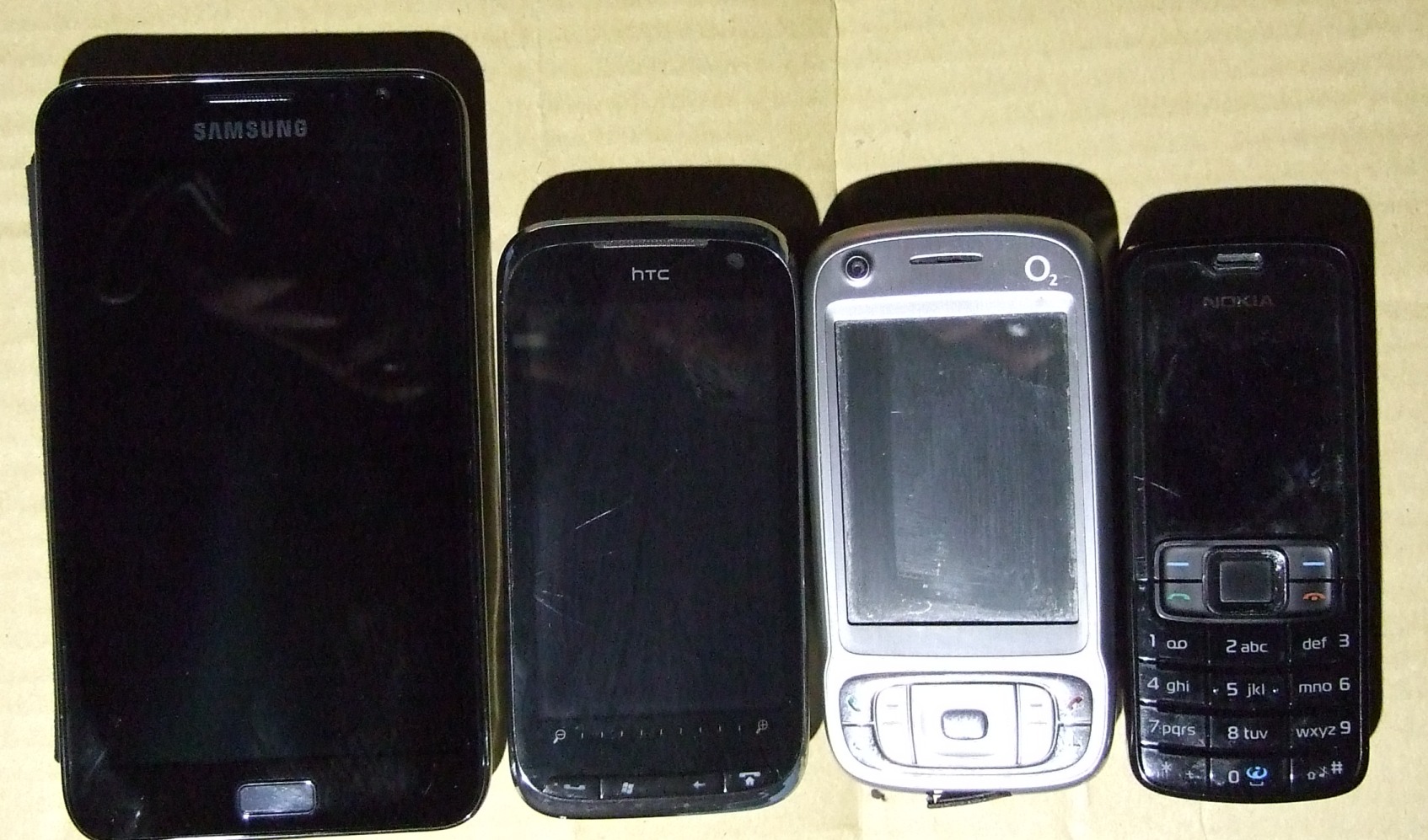
For comparison, here’s a picture of the Galaxy note next to my old HTC Touch Pro II, HTC Kaiser, and my ancient trusty Nokia work phone. (Apologies for the quality.)
The Galaxy Note next to some of my earlier devices
Innards
The Note comes with a 1.4GHz dual-core chip, 1024MB of RAM and 16GB of internal storage. There is also a microSD card slot that can expand the storage space, though without serious tinkering the Note currently only reads cards in the FAT32 format which has a file size limit of 4GB. So while it’s capable of playing 720p video with ease you may have to do some file recoding to get full-length movies to fit.
Physical Controls
There’s a 3.5mm headphone jack at the top, which will take regular headphones but has the usual third connector for use with the supplied earphones / hands-free microphone. This also functions as the aerial for the inbuilt FM Radio, although I’ve found it will receive a lot of stations with just regular headphones or speakers connected.
The power button is over on the top right, and the volume controls on the left. Both are easy to reach, however I did find myself accidentally pressing the power button on occasion. Also, there isn’t a dedicated camera button – rather an unusual omission. Down at the bottom is the microUSB connector¹. There’s no video/media socket, but the Galaxy Note is capable of HDMI output using what’s known as an MHL adapter (sadly not included, but available fairly cheaply).
At the bottom of the screen bezel are the usual setting and back buttons, and a physical home button. (The US version has all capacitive buttons.) Unfortunately these cannot be used with the S-Pen – which I will get to shortly – which makes using the stylus a slightly less seamless experience.
We said earlier that the connector was proprietary. Apologies for this error.
Screen
The Galaxy Note has a vast 800 x 1280 pixel screen resolution, which at 5.3 inches gives it 284 dpi. The size makes reading on the display a much more pleasurable experience than on smaller devices. Full-size web pages can be read easily, and emails are much more accessible. One minor irk is that the colours on the AMOLED screen can have a strange cast to them. This can be partially rectified by setting the Screen mode to “Movie” (the US version seems to lack this option, at least at the moment). Nevertheless, the screen looks terrific.
Speakers / Microphone
I actually don’t make that many phone calls, but when I do I’ve found the Note perfectly capable. If the size isn’t an issue for you, the Note is definitely capable of being used as a primary phone.
The Pen
The second-most hyped feature of the Galaxy Note. While it was one of the main things that attracted me I must admit I use it very rarely, at least for everyday tasks. Android has evolved to the point where a stylus is redundant. That said, it does have a couple of very nifty features that I’ve been enjoying. Firstly, by touching the screen and clicking the button on the stylus, you can take a screenshot from any program – which has been pretty useful in writing this review. Furthermore, screenshots can be edited before being uploaded to Dropbox, or sent out via email or MMS:
On a more personal note I’m (very slowly) in the process of learning Japanese, and have been using the stylus heavily to practice my writing.
Battery Life
Battery life will of course vary depending on usage; the Note does have a generous 2500 mAh battery. With moderate browsing and emailing, the Note should easily last out the day.
Software
Like many Android users I’ve installed my own preferred apps on the Note, though I haven’t felt the need to install a third-party ROM. The Note currently comes with Android 2.3. Android 4.0 is due to land any time now, but it certainly doesn’t feel out of date.
The notification bar is very functional. As well as notifications from apps, I can see the battery status, current sound profile, and connectivity status. Opening up the status bar I can see my notifications in more detail, but also activate / deactivate the Wireless, Bluetooth, GPS, Silent Mode and Screen Rotation.
Expanded Notification Bar
Home Screen
Can’t speak too much about the home screen I’m afraid, as I replaced mine with ADWLauncher almost immediately (I’m pretty big on customizing my phones). Fairly major omission for a review I know, as Touchwiz is a significant feature on Samsung phones and is regarded as one of the best customized overlays. There’s the usual clock/weather widget, a calendar widget, Yahoo finances, and the Google Search bar and App shortcuts down at the bottom. As is usual with Android, the home screen can be rearranged to your heart’s content.
Keyboard
The Samsung keyboard works pretty nicely with the stylus. Touch the stylus button on the keyboard and a box opens allowing you to scribble words and have them translated instantly to text. It seems pretty accurate, though I’m not sure how much quicker it is than simply typing the words out.
Syncing
The Note requires you to sync with a Google Account, but also allows using an Active Exchange server. I haven’t tested this with a full Exchange account, however I have synced my Windows Live account which now supports the Exchange protocol. For anyone coming over from Windows Mobile, this means your contacts and appointments can remain on your Windows Live account and still be synced to the Note.
Email
The Note’s inbuilt email program is functional if a little basic. It supports standard IMAP / POP protocols, as well as Exchange Mail as already mentioned. Oddly, Gmail isn’t shown in this program by default and instead uses a separate program. As I rarely use my Gmail account this wasn’t an issue for me, but I can imagine it would be for anyone who wants to see their Gmail and other email accounts in one program. The Galaxy Note’s screen size allows the screen to be split in Landscape mode, with your inbox down the left and a preview window on the right.
Browser
Not much to say about the browser other than that it works – very well. Unlike on my Dell Streak, I’ve been using this to browse heavily and haven’t felt the need to install a third-party app. The browser will read web pages in full desktop or mobile mode, though I haven’t found a way of getting pages to display full desktop mode by default.
Calendar
The Note comes with Samsung’s own excellent S-Planner Calendar software. It’s a vast improvement over the standard calendar that comes with Android 2.3 and supports Year, Month, Day, 3 Day and Agenda views. While it will display multiple synced calendars, I haven’t yet found a way to successfully get it to sync with Google Tasks, which I do use heavily. Not too big a problem for me as I use a third-party widget to display my appointments and tasks, but it does lessen the usability of the S-Planner app.
Contacts / Phone
The Contacts / Phone screens have now been merged.
The Keypad screen allows you to search for contacts using the numeric keypad, a feature that was missing on the Dell Streak.
The Logs screen now displays text messages by default as well as your call log, which if you send as many texts as I do tends to clutter the screen up. It can be filtered to only show calls however.
The Contacts screen shows contacts from your Google Account, as well as any other account synced with the device – including Twitter and Facebook. Again this can clutter up the screen, but there is a search bar at the top. As usual, a contact that has entries in different accounts can have those accounts linked, allowing the device to pull a contact picture from Facebook or Twitter, or display their latest Twitter update or Facebook status. As I don’t use Facebook anymore I wasn’t able to test this feature fully; however it still doesn’t look as complete as HTCs excellent Sense interface on my old Windows Mobile Phone. Finally, there is a Favourites tab, showing you starred Android contacts, and the Groups screen, which splits your contacts down into whatever categories you have applied to them.
Google Maps
Google Maps has come on a long way since it was first introduced to Android devices, and is now an excellent navigation app. The Note’s screen size is larger than most commercial satnavs, and Google Maps looks glorious on it. It still however has the same flaws. Firstly, it requires an internet connection to download maps on the fly (although maps can be cached into memory), and the inbuilt speech engine (Pico TTS) doesn’t pronounce certain words that clearly. The Note does come with its own text-to-speech engine, but it didn’t work properly with Google Maps when I tried it.
All that said, Google Maps can certainly hold its own against commercial satnav devices, which is pretty impressive considering it is a free app.
Googles Map Screen
Googles Navigation Screen
Directions Screen
S-Memo
S-Memo is another app that makes excellent use of the stylus. Notes can quickly be typed or written out by pen and then saved, exported as an image, or shared out to the usual places. Handwritten notes can also be converted to text, and notes can be tagged or stacked. I’ve been using it at work in place of handwritten notes (which I invariably lose), it is a great little feature.
The S-Memo Ink-to-Text Feature
Polaris Office
The Note comes with Polaris Office rather than the usual Quick Note. While I don’t think the Note can completely replace a laptop for document editing, its larger screen serves it well. One feature I miss on Polaris Office is the ability to directly sync with Dropbox, which I used to find very useful for editing documents on multiple devices. I’ve yet to find one of my spreadsheets that won’t work on the Galaxy Note.
Sample Excel Sheet
Draft of this review
Multimedia
The Note is capable of 1080p and 720p playback. Strangely, I’ve found the native video player will play larger video files where the likes of Rockplayer won’t. I can only assume its because the inbuilt software can make full use of the Note’s hardware. The Music player is functional if slightly basic. It doesn’t have the same syncing ability as iTunes, but Android’s always been more about drag and drop. The inbuilt Gallery is great for flicking through images, which can be selected for editing, sharing, uploading or deletion. Unfortunately there’s no way to choose which directories show in the gallery, so if you use an app that has images spread out over multiple directories – Google Reader, for example – the Gallery can become so clogged as to be unusable.
Image Editor
While it’s certainly no Photoshop, it’s pretty impressive for a free app on a device this size. There’s the usual cropping abilities, resizing, inking and image adjusting. I’ve included a couple of pictures to demonstrate. Disclaimer – the cat isn’t mine.
Summary
In summary, with the possible exception of my HTC Touch Pro II (I still miss having a physical keyboard), this has to be the best phone I’ve ever owned. It’s my MP3 device, phone, primary means of reading emails, satnav, note-taker and e-book reader. It’s portable enough that it can be taken anywhere (if your pockets are large enough), and is that reliable I haven’t had to do a hard reset yet. If you’re after a phone with a little more screen real estate and power than your average smart phone, the Note is just the thing.
The mixed news: It’s pricey – ranging from €100 up front on a 24-month “I wish to buy all these airwaves” heavy use contract, to €300 if you only want to be committed for 18 months. That puts it on a level with only the iPhone 4S.
The medium news: Maths is hard. Or to be precise, arithmetic is tedious. But having hammered through nine different contract options, amortising the down payment to try and figure out which is really the best value, there is one inescapable conclusion. They’re all nearly the bloody same. The most expensive one has five times the minutes, ten times the texts and twice the data as the cheapest – but only costs a third more a month.
But will I need all those extra minutes, or can I save that third off the price? Well that really depends on how much I use now. And my current carrier O2 doesn’t put all that information in one place, so I have to go extracting it from each month’s bill… And of course it’s not presented in terms of what you actually used. Oh no, that would be far too simple. Unless that is you want to get it from the downloadable Excel spreadsheet – where they put your spend on voice, text and data all in a single column, so rendering it it ****ing useless.
What appears on the bill is how much you were charged for exceeding your allowance in that month. To work out what that means in terms of usage you have to divide it by the price, and nowhere on the site does it seem to say anymore what the tariffs for excess minutes, texts and data are for my contract. So I have to figure the pricing out from the spreadsheet – factoring in the VAT of course. And this still tells me nothing about the months when I was under my allowance; that I have to extrapolate from the bell curve (i.e., guess). Gaaaaah. My brain hurts. Shopping for toys ought to be more fun than this.
They do it to make their customers stay. We know that we might get a better deal somewhere else. We just can’t tell where.
Oh all right, I suppose it does merit a little more analysis than that. Rather like the iPhone 4S it’s another no-surprises upgrade. Solid – and in the case of the screen, substantial – improvements, but no hoverboots. Or maybe in Steve’s day we would have been convinced that the synergy of 4G connection speeds, high resolution screen and image-stabilizing camera creates an entirely new product with previously-unimagined purposes. Now it seems more for the stockholders than some mysterious cause.
What didn’t we get? A smaller iPad. An iPad with a pen input tool. An iPad with an iPhone in it. An iPad with an iPhone in it and a pen input tool that is also a Bluetooth phone receiver. Stuff like that. (I have to admit, in maybe a decade of designing tablets and phones in my head, nothing as out there as a pen you can make phone calls on ever occurred to me.) OK, gimmicky perhaps, but fun. Apple boringly stick to making a really good product that sells by the freighter-load.
Only one annoying element really. They’re not calling it the iPad 3 or the iPad 4G. They insist it will just be called “the iPad”, as if we’re expected to forget the existence of any previous, lesser iPads. A little Orwellian for my liking.
Donncha O’Cearrbhail, aged 19, from Birr, Co Offaly, faces up to 15 years in prison, while Darren Martyn from Galway is facing 20 years. They have been named among six suspected members of “hacktivist” group Anonymous and splinter groups including Lulzsec, Internet Fed, and AntiSec. They are accused, among other things, of hacking the Fine Gael website, the Fox broadcasting network and a Garda/FBI conference call. – Irish Examiner
It’s good to think that Ireland could be competing at the highest level of computer security hacking. But what exactly are these young guys alleged to have done that could merit them spending the best years of their lives in jail? It depends on the the leanings of the news source you read¹. To some this is organised crime, to others it’s children playing in the woods.
There is a breadth of motivations behind a movement like Anonymous, from the high-minded to the nihilistic, but its existence is actually positive. Yes, it and its ilk cause damage to companies that costs millions, they sometimes open up documents that should legitimately be private, they behave irresponsibly. But broadly speaking this is never done for private gain. It is sometimes done with a political, freedom-of-information motive, but mostly it is done simply to show that it can be done.
Playing? Well it’s a serious game. Because if Anonymous can do it, the commercial rivals of attacked companies can probably do it too. US Federal agencies can do it. And the governments of, say, China, Russia or Iraq can certainly do it. The big difference is, they won’t let you know that they’ve done it.
The charges involve breaches of security at both Fox and PBS, which shows an admirable lack of bias.
Tricky lighting led to overexposure and noise in the dark areas – soon corrected by The GIMP
All the time I’ve been writing articles under the heading “What Phone Is Right For You?“, I have never confessed to what I actually use myself. Do I favour the Apple or the Blackberry, Windows or Androids?
None of the above. There was a reason I didn’t bring my own choice into it – the phone that’s right for me probably isn’t right for you. Or most anyone, it seems. Don’t get me wrong, it is an extraordinary piece of kit. But it sold in the hundreds of thousands at best, rather than the millions a hit mobile device needs.
Which is a shame, because it could have been the future.
That device is the Nokia N900 – less a phone really than a tiny PC with phone capabilities. Of course that can be said loosely of any smartphone, but it’s true of the N900 in spades. On this one you can have an actual desktop, and edit office-standard documents in powerful applications. Not bad for something you can carry around in your pocket.
Nokia achieved this with the help of the Open Source Software community – people who create free programs because they believe information technology should be free. Or just for the hell of it. OSS has brought us many great things, famously the Firefox browser of course, but also the free alternative to Windows and Mac OS called Linux.
The N900’s “Maemo” operating system is, like Ubuntu, based on the respected Debian¹ variant of Linux, so installing full-scale desktop applications is relatively straightforward. One great example: The GIMP², an Open Source alternative to Photoshop with all the image-editing power you could want. Thanks to this I was able to take, correct and upload the image above entirely on the phone.
And the usefulness only begins there. By hooking up a mouse and keyboard and using the TV-out as a monitor, I can have a desktop PC in any hotel room. Or indeed I can use the phone itself as a Bluetooth mouse and keyboard to control a PC from bed – which came in darn useful when I was ill – or control TVs and so on with its infra-red output. It’s versatility is matchless. Furthermore it excels as a media player, with powerful stereo speakers and a screen that wasn’t surpassed until the iPhone 4 came out.
The N900 with its keyboard open
Its greatest strength though has to be its browser. Nokia had been making specialised “Internet tablets”, portable Web browsing devices, as a semi-experimental sideline since 2005. The N900 just took that and added phone call abilities. Its browser therefore is proper Firefox, just with a finger-friendly interface, and brooks no ‘mobile view’ nonsense. It displays Web pages exactly as they’d appear on a desktop. With Flash, of course.
And though the phone aspect is a late addition, its integration is exemplary. Skype is just there – you can make and receive VoIP calls just as easily as ordinary ones. Similarly, IM services like Facebook and Google Chat integrate seamlessly with the phone’s text messaging. Contacts on different social networks can be merged into a single address book entry too. That’s just the way it should be.
So, what the hell went wrong? If this was such a paragon of smartphone virtue, why did no one buy it? Hopefully I’ll have the strength to face that sorry tale tomorrow.
Poignant little story – Debian was named for its creator, Ian, and his girlfriend Deb – before they broke up. He’s going to have a hard time forgetting her now.
The GIMP stands for The GNU3 Image Manipulation Package.
GNU stands for GNU Is Not UNIX4. Recursive acronyms are kind of an OSS in-joke.
…Will be resumed as soon as possible. I’m in bed with a bad cold.
Well I say bed, it’s more the couch, in front of the TV. Sipping a hot drink. I’m recording TV and updating my phone. In the oven, a whole chicken is roasting for dinner. It doesn’t sound much like hardship, and I have to admit it’s not. I’d probably enjoy doing this little – if I was doing it of my own free will.
But I’m cooking the chicken now because on Sunday I was too fuzz-headed to figure out how, and I haven’t written this blog – or done anything much else even remotely constructive – in days. I think the closest I got to creativity was a couple of rounds of the Game of Liff over on my friend Susan’s blog, and even then I faded out almost immediately.
That’s typical in fact. I don’t feel so bad – my inner ears are little diving bells, but there’s no other real discomfort – I just can’t concentrate. Not that I’m a paragon of laserlike focus when I’m well, it might be admitted, but now I’m all, you know, kind of
That was going to be a sentence that trailed off aimlessly, but while I was writing I honestly fell asleep. Weirdly, my attempt to describe reality became the reality. But I feel a bit better for it at least. Maybe today I can write something coherent.
There are phones and there are tablets, and basically the only difference between them is size. But that difference is not trivial. Far from it; in mobile technology, form factor is everything. Difference in size means difference in purpose. A tablet is as big as is comfortable to use for ‘media consumption’ on the couch, a phone as small and portable as it can be while remaining usable. Anything intermediate is a compromise that falls between stools. Such is contemporary design wisdom.
And it’s wrong. People use their phones more and more for browsing, reading, viewing media and playing games. All else being equal, these will always be better on a bigger screen. So it’s very arguable that the best portable device is the biggest one you can comfortably carry. How big is that though, exactly?
Bigger than you might expect. Samsung‘s view – and I tend to agree with them – is that the upper threshold is what you can easily get in and out of an ordinary jeans pocket (video). In most ways, their new Galaxy Note is just an upgraded version of their popular Galaxy S II. What sets it apart is its simply humongous 5.3″ screen, surely as big as a mobile phone can get and still remain mobile. That’s not a compromise, that’s pushing an idea to its extreme. Seen this way it’s the recent generation of 7″ Android tablets that fell between two stools – smaller than the iPad, but not small enough to be truly portable.
Some reviewers have worried about looking foolish, holding such a large device up to the face. Well yes, maybe this is not the phone for the overly self-conscious. But I suspect it will attract more glances of interest, even envy, than amusement. It’s not merely the size of the screen that makes it stand out. With its resolution of 1280 x 800 – higher than the iPad – and luxuriant saturated AMOLED colours, it’s gaining a reputation as one of the most beautiful ever seen on a mobile device.
But the controversies only begin with the Note’s size. There’s also that pen. How can the addition of an input device somehow be a fault? For this we can blame Steve Jobs. Making a dig at the original Windows Mobile, he said “if you see a stylus, they blew it.” He was wrong too though. If you need a stylus they blew it, sure. Poking at tiny icons with a stick is not cool. But the Note has a touch interface as good as any of its rivals. More than one review has seemed almost to take offence at this. If you don’t need the pen to use the phone, what’s it doing there?
For sure, it would still be a fabulous device without it. You could use the Note merely as a huge-screened Web browser, HD video player and camera, e-book reader, satnav, tablet, gaming device etc. without ever withdrawing the pen from its bay. But for others – myself included – that pen is precisely the reason why we’ll be giving our money to Samsung. This is no plastic stylus. An advanced, sensitive pen would be a brilliant complement to a device big enough to use like a notebook. And once again Samsung has not cut any corners, using gold-standard technology from Wacom, makers of the Intuos and Cintiq tablets found in graphics studios worldwide. The sketching, annotation and handwriting possibilities this “S-Pen” adds put the Galaxy Note into a league of its own. Or would, if its screen hadn’t already.
It may not be on its own much longer though. It’s being joined by a rival product from fellow Koreans LG. Their Optimus Vu will have comparable dimensions and also comes equipped with a pen – rejoicing in the name “Rubberdium”. (No clues as to what the technology is yet, but they describe it as dedicated so it is probably an active device.) And it may be far from the last. The fourth iteration of Android, with its ability to scale to different screen sizes and its inbuilt support for pens, seems tailor-made for devices like this. (The Note does not actually have Ice Cream Sandwich yet, but will get it as soon as it’s ready – possibly next month.) With these features clearly part of Google’s vision, will we be seeing a phablet from Motorola next?
I hope so for the sake of diversity, but speaking for myself it’s hard to imagination any device in the near future improving on the Galaxy Note. Wacom technology appearing on a phone is a long-held dream I seriously thought would never come true. So I want to use this more than any device I’ve seen in nearly ten years. And frustratingly, about anywhere in the world seems to be getting the Note before Ireland. Vodafone has at least have confirmed they will be carrying it though. No details on pricing yet, but if you want you can register your interest here and get notified as soon as it goes on sale.
Just one question remains then – what will we call this new class of device? Phablet seems to be catching on, even if some abhor the word. Well, it’s not as bad as tabphone or phoneblet. I have a different suggestion though. We could take a word that technology has made redundant and give it a new job. Let’s call it the Phonebook.
We send them money, they send us more or less everything. Simple.
Actually there’s a lot more to it than that. It may seem that our money is going there never to return (except in the form of loans and – perhaps – investments), but China’s increasing wealth is little more than a side-effect of the highly integrated role that it now plays in the world economy. China is a machine for transferring wealth all right, but while some of it goes to the rich in China and some even goes to the poor there, most of it flows from our poor to our rich, here in the West. It’s the great money pump. As such it plays a very useful role in the destruction of democracy, by democracy.
Think back to those far-gone days when Capitalism seemed to actually work. Owners of businesses would employ people who would then be able to buy things from businesses. It was a two-way street and it worked well enough. The owners arguably got more than their fair share and working conditions were downright dangerous in the early days, but overall it was a benign circle where people saw their incomes rise.
It began to fail only when everyone, more or less, had a job. This meant that the labour supply was no longer an endless resource, and that very much strengthened the position of the “working class” in their campaign for a bigger share. Labour was still a renewable resource though, so at this point things might conceivably have reached an equilibrium. But capitalism is driven not by profit, as you might assume, but by increasing profit. Its most powerful members after all are not those who create wealth, but those who have it already. Investment will go not to what might make a sustainable economy or society, but to whatever can return the biggest immediate margin.
And one of those things was China, where labour seems again to be in infinite supply and working conditions can be just as dangerous as the good old days. Now instead of paying people in their own countries, businesses can pay people in China to make things to sell to the people of their countries. As owners of the patents, the brand names, the “intellectual property”, they still get the lion’s share of the profit from these Chinese-made goods. The transfer of wealth thus becomes a one-way street, from the poorer to the richer in our society, with China merely taking a commission as agent.
Most people in the West are still employed of course, but more and more they’re employed in secondary jobs that have little control over the production of actual saleable goods. I don’t think government is ever going to be brought to its knees by a mass stoppage of supermarket managers or Web designers. Robbed of this bargaining chip, people’s incomes are falling in real terms. It’s just that we don’t notice because the cost of many goods is rapidly falling too – thanks to them being made in China. It’s the tasks we cannot effectively outsource – health and education for example – that show how the real wealth of our society is decreasing.
Thanks to China. the rich no longer really need the rest of us as much as they once did. Which explains why the wealth gap is rapidly increasing. So China does turn out to be a threat to democracy, if not in a way that anyone expected back in the Red-Scare 50s. My question is this: If we encourage Chinese investment here, will it help us focus on finding solutions to this very dysfunctional relationship – or will it simply buy our silence?